By Vincent Howard, CPA | Managing Partner, Howard, Howard and Hodges | Skillability for Accounting Firms
Last updated: 2026 | 12-minute read
The Short Answer (TL;DR)
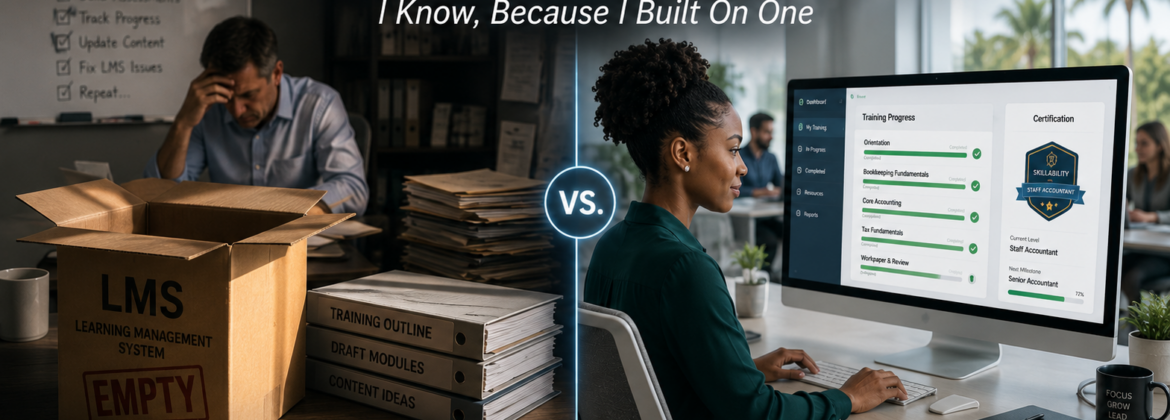
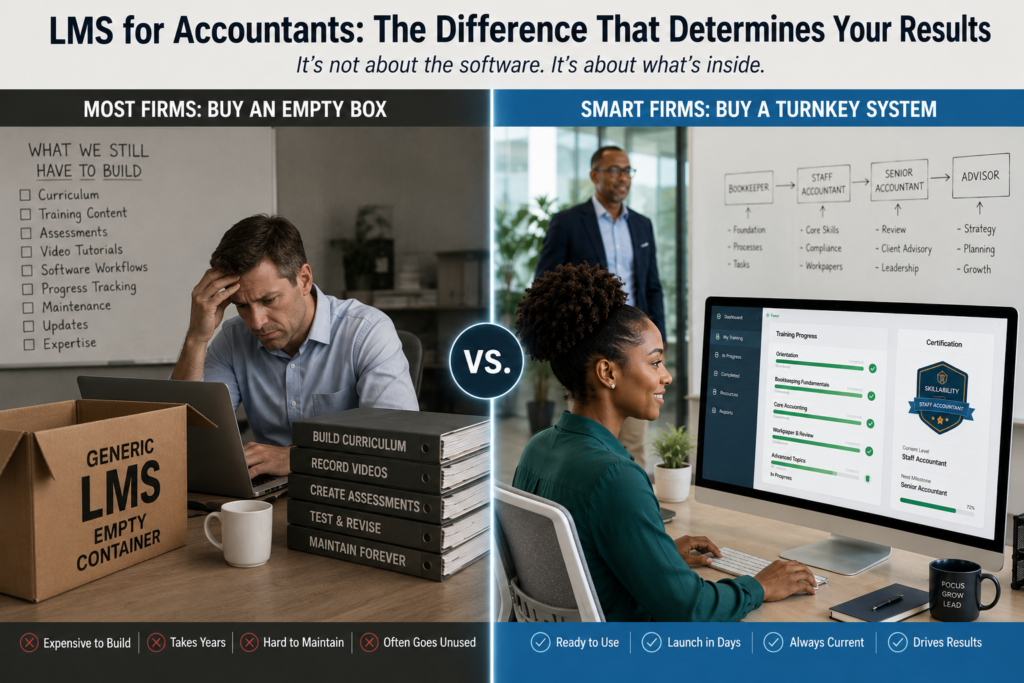
An LMS — a learning management system — is a delivery container, not a training program. When an accounting firm buys a generic LMS (TalentLMS, LearnUpon, Moodle, or similar), it is buying empty shelving: the pipes to deliver content, with zero accounting content inside. The firm then faces a multi-year curriculum development project that most owners never finish, which is why most firm-purchased LMS subscriptions quietly become expensive document folders. What accounting firms actually need is a turnkey training system: pre-built, execution-based curriculum inside the firm’s actual software (QuickBooks Online, Accounting CS, UltraTax, Xero), with gated pass/fail assessments and progress tracking already engineered in. Evaluate any “LMS for accountants” on one question first: is the accounting curriculum already built, or am I buying a container and a construction project?
I’m going to make this argument from an unusual position — as someone who built his firm’s training system on top of a generic LMS, fought that software’s limitations for years, and learned exactly where the category fails accounting firms. Here’s everything that experience taught me.
Who I Am and Why You Should Listen
I’ve been in public accounting since 1990. I founded my own firm in 1993, merged it in 2001 to form Howard, Howard and Hodges, and grew it from three people to 50 staff across four locations and multiple states.
In 2020, facing the onboarding pain every growing firm faces, I did what most firm owners consider doing: I got an LMS and started building training on it. Except I actually finished — and it took years. I personally authored every module: the full bookkeeping pathway from debits and credits through year-end W-2 and 1099 processing, the tax preparation tracks for 1040s, 1120Ss, and 1065s, the advanced modules on Section 754 elections and Section 1202 stock, the client-facing business fundamentals series. I built the assessments, structured the gated progression, and shot the software walkthrough videos for multiple platforms — Thomson Reuters Accounting CS, QuickBooks Online, Intuit Desktop, UltraTax.
I also fought the LMS software itself the entire way. For years, the platform’s permission system wouldn’t let member firms add their own users without assigning every course in the sequence manually — we yelled at the vendor repeatedly, got nowhere, and eventually had to engineer our own backend automation to work around the software’s limitations. That’s the part of the LMS story nobody tells you in the sales demo.
Today, over a thousand learners across dozens of PASBA member firms have gone through what that project became. So when I tell you what an LMS is and isn’t, I’m not theorizing about the category. I lived inside it.
What Is an LMS — and What Isn’t It?
A learning management system is software for delivering, tracking, and administering training content. It handles user accounts, course enrollment, video hosting, quiz delivery, completion tracking, and reporting. Think of it as the building: classrooms, hallways, a front desk, attendance records.
Here is what an LMS is not: the curriculum, the instructors, the exercises, the assessments, or the expertise. The building comes empty.
This distinction sounds obvious written down. In practice, it is the single most expensive misunderstanding in the accounting firm training market. Firm owners search “LMS for accountants,” find a polished platform with a reasonable per-seat price, sign up — and only afterward confront the question the demo never raised: who is going to build the actual accounting training?
The answer, at most firms, is nobody. Which is why the LMS purchase so often ends the same way: a few orientation PDFs uploaded in month one, a compliance video added in month three, and then a quiet annual renewal of software nobody uses. The firm believes it “has training” because it has a training system. It has shelving.
The Build-It-Yourself Math Nobody Runs Before Buying
Let me quantify what “just add your own content” actually costs, because I am one of the few people who has done the full project and can put real numbers on it.
A complete new-hire bookkeeper curriculum — the kind that takes someone from day one to independently processing client work — requires, at minimum:
- A full simulated client year of sample data: 12 months of transactions, bank statements, payroll runs, sales tax scenarios, asset acquisitions and dispositions, and a year-end package — all internally consistent, all realistic, all reconcilable
- Software-specific walkthrough videos for every workflow in every platform your firm uses — and when Intuit redesigns the QBO layout (which they did, mid-rollout, with holes in their own release), you re-record
- Assessments engineered around the work product — questions that can only be answered correctly if the trainee’s financial statements and returns are actually right, with pass thresholds and gated progression
- Trainer guides, time benchmarks, and progress standards so managers know what normal looks like
Conservatively, that is hundreds of hours of senior-level subject matter expertise — not admin time, not intern time, but the time of someone who deeply knows both the accounting and the software. Price your own hours honestly at $200+ and the “affordable” $99/month LMS is now a six-figure curriculum development project wearing a SaaS price tag. And it’s a project with a maintenance tail forever: tax forms change annually, software interfaces change without warning, and stale training is worse than no training because it confidently teaches the wrong screen.
I’m not guessing at this. I built it. It consumed years of my professional life — and I’m a CPA with 35 years of practice experience and an unusual tolerance for building things. The typical managing partner of a 15-person firm has neither the hours nor, frankly, the appetite. Nor should they. Their job is running a firm.
The decision framework
| Question | Generic LMS (build it yourself) | Turnkey accounting training system |
|---|---|---|
| What you’re buying | Empty delivery container | Container + complete pre-built curriculum |
| Accounting content included | None | Full bookkeeping, tax prep, and advanced pathways |
| Software-specific training | You record it | Already built for QBO, Accounting CS, UltraTax, Xero |
| Sample data sets | You create them | Full simulated client years included |
| Assessments and gating | You design them | 80% pass/fail gates engineered in |
| Content maintenance | You, forever | Handled by the platform |
| Realistic time to first trained hire | 12–24 months (if the build ever finishes) | The week you sign up |
| True first-year cost | Subscription + hundreds of senior hours | Flat subscription |
The generic LMS makes sense in exactly one scenario: a large firm with a dedicated L&D department and genuinely idiosyncratic workflows that no off-the-shelf curriculum could serve. For the 5-to-50-person firm — which is most of the profession — buying the empty container is buying a project, not a solution.
The Five Failures of Generic LMS Platforms in Accounting Firms
Beyond the empty-container problem, the generic LMS category has structural weaknesses specific to our profession. I hit every one of these personally.
1. They measure completion, not competence
A generic LMS tells you an employee watched the video and clicked “complete.” It cannot tell you whether they can reconcile a bank account. In accounting, that gap is everything. Real training validation means assessments built around actual work product — if the trainee’s January sales tax return is wrong, the assessment exposes it, because the questions are derived from the numbers a correct return would produce. No generic platform ships with that; it has to be engineered, module by module, by someone who knows what right looks like.
2. They have no concept of accounting workflow
An LMS treats a course on Excel and a course on partnership basis identically: video, quiz, certificate. But accounting competence is sequential and cumulative — you cannot meaningfully learn year-end 1099 processing before you’ve processed the year. The gated pathway structure (foundations, then Q1, then progressively complex quarters, then year-end) has to be imposed on the software, and most generic platforms actively resist it. Ours did: for years the permission architecture couldn’t even handle “assign two starter courses and auto-unlock the rest as they’re passed.” We ultimately had to build automation behind the vendor’s back to make the software do what training logic required.
3. Admin friction lands on the firm owner
The sales demo shows a clean dashboard. Reality is the firm owner discovering that adding one user requires manually assigning twelve courses in the right order, that the reporting view buries the one number that matters (is this hire on pace or not?), and that deleting a failed trainee requires a support ticket. Every piece of that friction is time the firm owner spends administering training software instead of running a firm — the exact problem the purchase was supposed to solve.
4. They can’t see time-on-task the way accounting training requires
One of the most diagnostic numbers in all of training data is how long a trainee takes on a foundational module. In our system, experienced bookkeepers finish Module 101 in three to four hours; newer professionals take eight to twelve; and a struggling mis-hire shows up immediately — sixteen-plus hours with incomplete work. One member firm watched exactly that pattern surface, and the mismatched hire resigned on day six, saving everyone months. That early-warning system only exists when the platform tracks active in-course time properly and managers know the benchmarks. Generic platforms treat time data as an afterthought; in accounting onboarding, it’s the smoke alarm.
5. They train in sandboxes, not software
Some LMS-based accounting courses solve the content problem with simulations — a mock interface that resembles QuickBooks. The problem: your new hire’s competence has to live in the real software, with the real folder structure and the real quirks. Training that happens inside the actual applications — working left to right, top to bottom through UltraTax’s actual folders and tabs, eliminating wasted keystrokes — transfers on day one. Sandbox training restarts on day one.
So What Should an Accounting Firm Actually Buy?
Reframe the search. You are not shopping for a learning management system. You are shopping for a talent production system — and the LMS buried inside it is an implementation detail, the same way you don’t shop for a database when you buy tax software.
Here’s the evaluation checklist I’d hand any firm owner, in priority order:
- Is the accounting curriculum already built — completely? Not “customizable templates.” Not “a content library you can adapt.” A finished, sequenced pathway from day-one fundamentals through year-end processing, with sample data included. If the answer involves you creating content, you’re buying shelving.
- Does training happen inside your actual software? Ask specifically: QuickBooks Online, Accounting CS, UltraTax, Xero — whichever your firm runs. If the demo shows a simulation, the muscle memory won’t transfer.
- Are assessments gated and work-product-based? Can a trainee skim ahead? If yes, the completion data is theater. The standard should be: pass at 80% on questions derived from the actual work, or the next module stays locked.
- Can you see the numbers that predict outcomes? Time per module against benchmarks, pass rates, current position in the pathway — visible to you, without a support ticket.
- Does the pathway extend beyond onboarding? The same system should carry a bookkeeper toward financial statement analysis and advisory capability — because in a profession where automation is absorbing data entry, onboarding is just the entry ramp. Development is the retention engine.
- Who maintains the content when the software changes? Get this answered explicitly. Intuit will redesign QBO again. Tax forms will change again. If the maintenance burden is yours, see point one.
And one question to ask yourself rather than the vendor: do I want to be in the curriculum development business? I was, for years, by necessity. It worked out — it became Skillability — but I would not wish the build on a practicing firm owner. The entire point of buying training infrastructure is that someone who already did the work hands it to you finished.
How to Implement a Training System at Your Firm (Without It Becoming Shelfware)
Buying right is half the battle; implementation is the other half. The pattern that works, across the firms we’ve onboarded:
Week 1 — Set up and benchmark. Configure your firm’s account, add your trainer/admin, and have one experienced staff member run the first module. Their completion time becomes your firm’s internal benchmark — fast staff in our network finish foundational modules in three to four hours, and knowing your own baseline makes every future hire’s data instantly interpretable.
Week 2 — Run a current employee through it. Before any new hire touches the system, put a recent-ish hire or a junior staff member through the relevant pathway. You’ll surface skill gaps you didn’t know existed (this happens at nearly every firm), and you’ll have an internal advocate who can tell the next new hire “yes, the system is legit.”
Hire-by-hire — Move testing in front of the offer. The biggest single ROI move: use pre-employment assessment before the offer letter, not after. One avoided mis-hire — one candidate whose resume said “QuickBooks proficient” but whose assessment said otherwise — pays for the platform many times over.
Day one forward — Let the system run, and protect the gates. The discipline that matters most in implementation is the one that costs nothing: don’t override the gates. The first time a manager waves a struggling trainee past a failed assessment because “we need them on client work,” the system’s data stops meaning anything. The gates are the product.
Days 30/90/180 — Pair the data with conversations. The research is unambiguous that structured check-ins at these intervals cut first-year turnover by 30–40%. The training data gives those conversations substance: here’s where you started, here’s what you’ve passed, here’s what’s next on your pathway.
Total firm-owner time investment for a proper implementation: a handful of hours in the first two weeks, then minutes per hire forever after. That’s the whole point.
Frequently Asked Questions
What is the best LMS for accountants?
The honest answer is that “LMS” is the wrong category for most accounting firms. Generic platforms (TalentLMS, LearnUpon, Moodle) are well-built delivery containers with zero accounting curriculum inside — buying one commits the firm to a curriculum development project requiring hundreds of senior-level hours. CPE platforms (Becker, Surgent, Checkpoint Learning) deliver knowledge and credits, not operational software skills. For onboarding and upskilling, firms should evaluate turnkey accounting training systems where the complete curriculum — software-specific, execution-based, with gated assessments — is already built. The deciding question: is the accounting content finished, or am I buying a container?
What is the difference between an LMS and a training program?
An LMS is software infrastructure: user management, content delivery, quiz administration, and completion tracking. A training program is the actual curriculum: the sequenced lessons, sample data, exercises, software walkthroughs, and assessments that produce competence. An LMS without a training program is an empty building. Most accounting firms that “bought an LMS” and saw no results bought the building and never finished constructing what goes inside it.
How much does it cost to implement an LMS at an accounting firm?
The subscription is the small number. Generic LMS platforms run roughly $99–$500+ per month depending on seats — but the real cost is content creation: a complete new-hire accounting curriculum requires hundreds of hours of senior-level expertise (realistic sample data, software-specific videos, work-product-based assessments), plus permanent maintenance as software interfaces and tax forms change. Priced at senior billable rates, the self-build is a six-figure project. A turnkey accounting training system with the curriculum pre-built runs a flat subscription (ours is $675/month covering five active seats plus a $1,000 setup fee) and is producing trained staff the week you start.
Can I just use free bookkeeping courses to train my staff?
Free courses (Intuit Academy’s bookkeeping certificate, Coursera offerings, YouTube content) teach general bookkeeping knowledge from the perspective of an individual learner or small business owner — not a multi-client firm workflow. They lack firm-specific software training, have no gated competency verification, produce completion certificates rather than validated skills, and give the firm owner zero visibility into whether the employee can actually process client work. They’re reasonable supplements for a motivated individual and inadequate infrastructure for a firm. The test: after the free course, can your hire independently produce a client’s monthly financials, sales tax return, and reconciliation in your software? If you can’t answer with data, the training didn’t happen.
How long does it take to implement a training system at a CPA firm?
With a turnkey system: functional in the first week, first benchmark data within days, and a new hire can start the pathway immediately — full new-hire bookkeeper onboarding then runs two to three weeks to independent productivity. With a generic LMS requiring self-built content: 12 to 24 months before a complete curriculum exists, assuming the build is ever finished — and at most firms, it isn’t. The implementation steps that matter are the cheap ones: benchmark with an experienced employee first, move skills testing before the offer letter, and never override failed assessment gates.
Do accounting firms really need an LMS at all?
Firms need three things an LMS category promises but doesn’t deliver by itself: consistent onboarding that doesn’t consume senior billable hours, objective verification that staff can actually do the work, and a visible development pathway that retains people. If a system delivers those three — pre-built curriculum, real-software training, gated assessments, progress data — what it’s called doesn’t matter. If it doesn’t, the most polished LMS in the world is an expensive folder of PDFs. Buy the outcome, not the category.
The Bottom Line
The LMS industry sells containers. The accounting profession needs contents. That mismatch is why so many firms have a training platform login nobody has used since the quarter it was purchased — and why the shadowing method survives at firms that technically “have an LMS.”
I spent years building the contents the hard way, fighting generic software the entire time, because nothing finished existed for our profession. That build is done now. No firm owner should have to repeat it — and no firm owner running a practice realistically can.
So when you evaluate anything marketed as an LMS for accountants, skip the feature tour and ask the only question that predicts whether the purchase will matter: when my next bookkeeper starts Monday morning, is there a complete, software-specific, assessment-gated pathway waiting for them — or is there an empty box waiting for me?
You are not losing to better competitors. You are losing to your own training infrastructure. Buy the finished version.
Want to see a fully built accounting training system instead of an empty container?
Book a 10-minute structural alignment review at calendly.com/skillabilitydemo
In ten minutes we’ll walk you through the complete pre-built pathway — bookkeeping fundamentals through year-end processing, tax preparation tracks, and the advisory upskilling catalyst — running inside the software your firm already uses, and calculate what your current approach is costing per hire.
Put your next hires through our system. If they don’t pass our modules and aren’t autonomously delivering client-ready work within 45 days, we refund 100% of your enrollment fee and pay your monthly subscription out of our own pocket.
To your firm’s capacity,
Vincent Howard, CPA Managing Partner, Howard, Howard and Hodges Skillability for Accounting Firms
Vincent Howard, CPA has practiced public accounting since 1990. He holds a Master’s degree in Taxation, leads a 50-person multi-state firm, and personally built the Skillability training platform used by accounting firms nationwide through the PASBA network. His firm was named PASBA Firm of the Year.
© 2026 Skillability for Accounting Firms. 45-Day Out-of-Pocket Performance Guarantee applies to qualifying onboarding engagements. Contact us for full terms.